GeoDetectit is a metal detecting app built for real field work
GeoDetectit helps metal detectorists plan search areas, track GPS in the field, document finds with photos and export their work in open formats. It is designed as an offline-first and privacy-first field tool, not just a simple hobby tracker.
Why a dedicated metal detecting app matters
Many detectorists still rely on memory, screenshots, scattered notes and several different map services. That makes it harder to track coverage, revisit promising locations and keep documentation together.
- the same ground may get searched twice
- find locations can become unclear later
- photos and notes are easily disconnected from the map
- analysis and reporting become harder over time
What GeoDetectit does differently
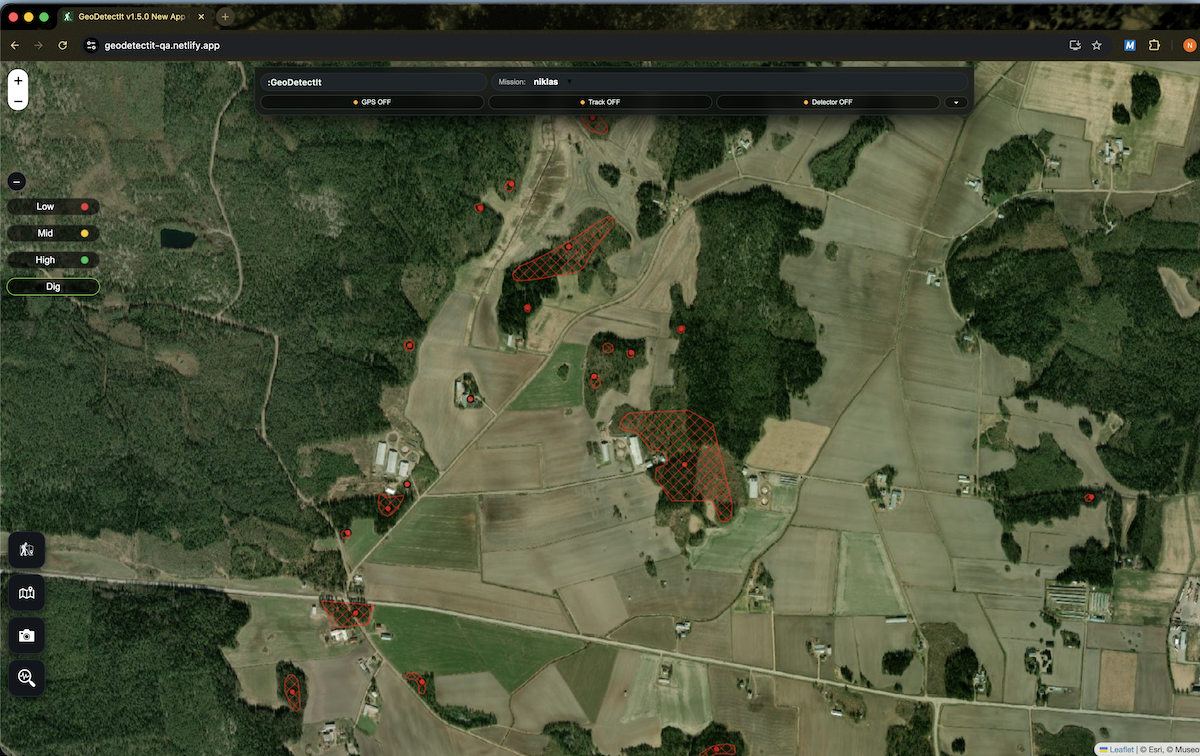
GeoDetectit combines mapping, tracking, photos and export in a single workflow designed for detector field use.
- missions for each field or site
- GPS tracks and coverage awareness
- find logging and geotagged photos
- map layers relevant to detector work
- open export to GeoJSON, GPX, KML and ZIP
Plan search areas
Create missions and draw areas before going out, then continue over several sessions.
Track GPS in the field
See where you walked and build a more systematic search pattern.
Document finds
Attach photos, notes and location to keep a more useful field archive.
Useful map layers for detectorists
GeoDetectit is built to gather relevant map layers in one place so you do not need to jump between multiple services.
- topographic maps
- orthophotos
- cadastral boundaries
- protected heritage layers
- regional and local overlays
Example: Finland
In Finland, Maanmittauslaitos (MML) provides valuable terrain maps, orthophotos and cadastral information. Museovirasto provides information about protected heritage and archaeological sites.
That combination makes a strong example of the kind of field context detectorists often need in one workflow.
Who this app is for
GeoDetectit is aimed at detectorists who want more structure than simple note-taking or screenshots can provide. It is especially useful for people who revisit the same sites, work with photos and maps, or need better documentation later.